






















An approval is useful only if everyone knows which version the customer approved. Before a job reaches the press, check the design, placement, dimensions, colors, garment details, and any instructions that affect the finished order.
The goal is not a longer email. It is a clear answer to “What exactly are we making?” that the customer, office, and crew can all find.
Separate the order decision from the artwork decision
A customer can agree to the price while the artwork still needs work. They can also approve a design while a changed quantity, delivery date, or charge remains unresolved.
Keep those decisions distinct in your process. When a revision changes the work or price, review the order as well as the proof. Do not leave the press operator to interpret whether an email saying “looks good” applies to the original design or the latest revision.
Check these details on the proof
| Detail | What the reviewer needs to see |
|---|---|
| Design version | A clear version or revision reference. |
| Garment | The relevant style and color, with exceptions called out. |
| Print location | Front, back, sleeve, or another clearly identified area. |
| Dimensions | Intended print dimensions rather than a mockup alone. |
| Placement | The agreed reference point and any special positioning instructions. |
| Colors | The agreed color references and any limitations discussed with the customer. |
| Wording | Names, dates, spelling, phone numbers, and other details that can be overlooked. |
| Variations | Different artwork, placements, or names within the same order. |
A mockup helps people picture the result, but it can leave measurements open to interpretation. Record dimensions when the job depends on them. If color matching matters, agree on a physical reference instead of relying on how the proof looks on a screen.
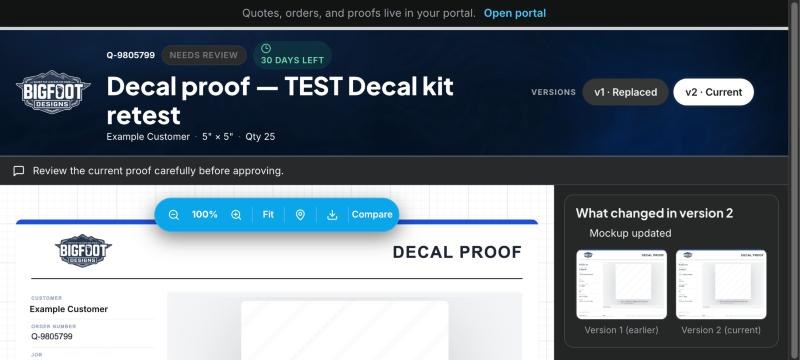
OBPrint example: the customer review page identifies the current proof and shows the earlier version for comparison. Production still needs to verify the approved version against the job instructions.
Give changes a clear return path
Ask the customer to describe the requested change against the proof being reviewed. Make the revision, identify the new version, and request approval of that version.
If a change comes by phone or an unrelated email, put it in the job record before work moves forward. Otherwise, the person who took the call may be the only one who knows about it.
Avoid naming three files “final.” A version number or another consistent label helps the crew tell the approved work from older options.
Check readiness before sending the job to the press
Artwork approval is one readiness check. It does not establish that garments have arrived, quantities have been counted, or production setup is complete.
Before release, have the responsible person confirm:
- The approved artwork version is identifiable and accessible.
- The work order agrees with the approved garment, location, and decoration details.
- Changes affecting quantities, price, or due date have been reviewed separately.
- Required materials and production preparation have been checked.
- Any exception has a named owner and a clear next action.
For example, if a customer approves the back print but is still revising the front, record that distinction. Do not let a general “approved” note conceal an unresolved part of the job. This is a process recommendation; check how your chosen software represents partial approvals.
How OBPrint supports proof review
OBPrint supports customer proof review through a link, with approval or a request for changes. Proof versions and job-linked records help staff locate the artwork and its review history. See proofs and work orders for the workflow.
Your team still decides when the job is ready. The record helps them find the decision; it cannot check the garments on the shelf or resolve an unanswered customer question.
If you are evaluating a new system, include a proof revision in your real-job software test. Confirm that a crew member can find the right version without having watched the office enter it.
Common approval questions
Is an email approval enough for our workflow?
An email may record a customer's response, but your team still needs to identify which artwork and job details that response refers to. Keep the response with the relevant version and order. A vague reply detached from its proof is difficult for another staff member to interpret.
What if the customer changes artwork after approval?
Pause the affected work, assess what the change means for preparation, price, and timing, and obtain approval for the revised work before continuing. Keep the earlier version in the history so the team can understand what changed.
Where should we start improving the process?
Take one recent job that required extra explanation. Identify the missing detail and add it to your proof or release checklist. If you want to see how the record works in OBPrint, bring that example to a demo.